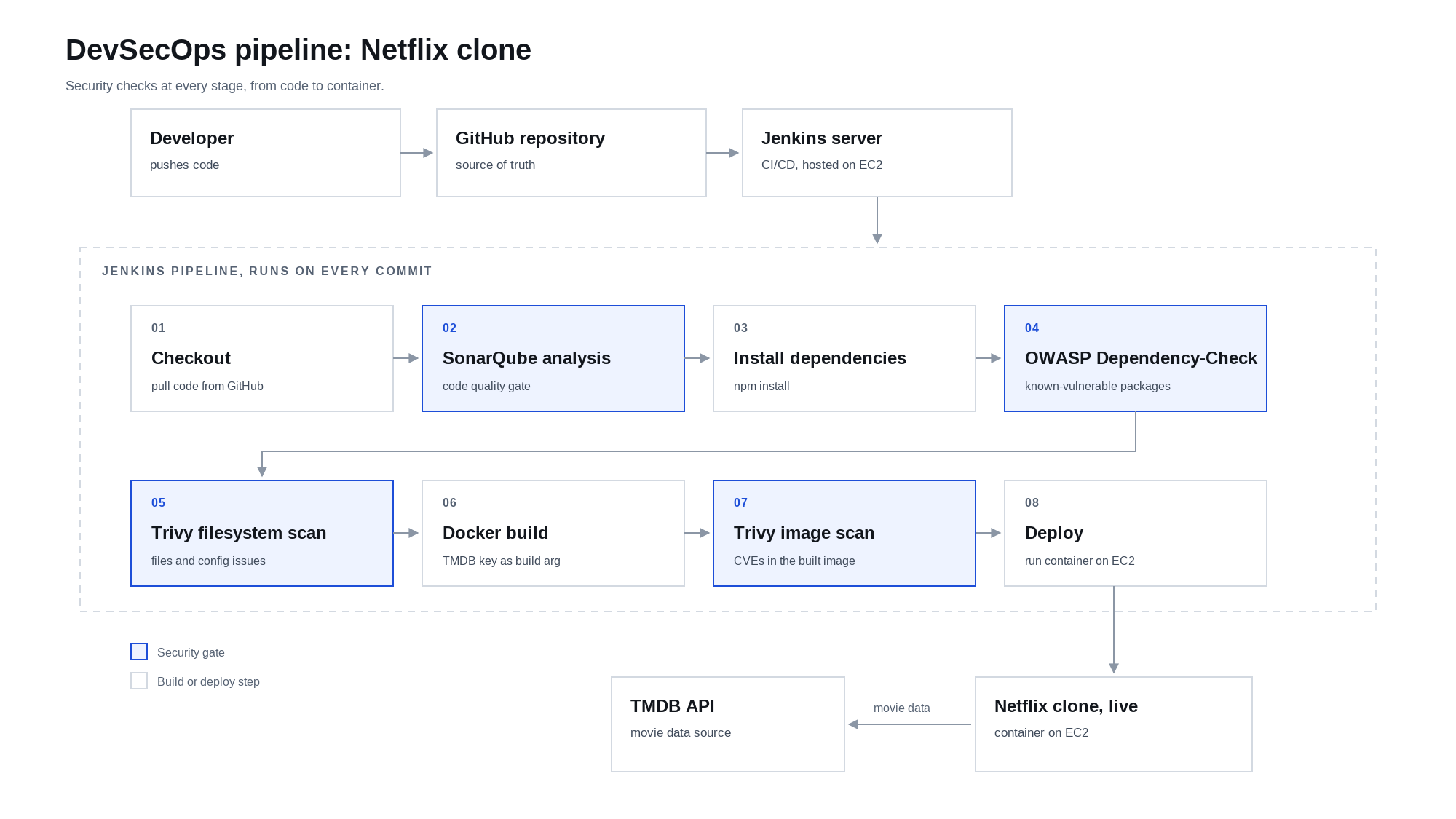
Overview
A CI/CD pipeline that builds, security-scans and deploys a Netflix-style streaming app, with security checks at every stage instead of only at the end.
Most projects ship code first and think about security later. The goal here was to build a pipeline where every commit is automatically checked for code quality issues, vulnerable dependencies and vulnerable container images before anything gets deployed. The app is a Netflix-style site that pulls movie data from the TMDB API, a free movie data service.
Architecture
- App: a Netflix clone frontend that fetches movies and trailers from the TMDB API using an API key.
- Source control: a GitHub repository.
- CI/CD server: Jenkins running on an AWS EC2 instance.
- Code analysis: SonarQube, which scans source code for bugs, code smells and security hotspots and enforces a quality gate.
- Dependency scanning: OWASP Dependency-Check, which finds known vulnerabilities in npm packages.
- Filesystem and image scanning: Trivy, which scans project files and the built Docker image for known CVEs.
- Containerization: Docker.
- Deployment target: an EC2 server running the container.
Pipeline stages
- Clean the workspace and check out code from GitHub.
- Run SonarQube analysis, then check the quality gate.
- Install dependencies with npm install.
- Run the OWASP Dependency-Check scan.
- Run the Trivy filesystem scan.
- Build the Docker image with the TMDB API key passed as a build argument, not hardcoded.
- Run the Trivy image scan.
- Deploy the container to the EC2 server.
Security concepts
- Shift-left security: catch problems early in the pipeline, before deployment.
- Quality gates that block bad builds.
- Secrets handling for the TMDB API key.
- Vulnerability reports at both the dependency level and the image level.
Status
The pipeline runs the eight stages above on every commit. Prometheus, Grafana, ArgoCD and Helm on Kubernetes are outside this build.
Credit
Based on the CloudChamp DevSecOps Project tutorial.